Running Bird bgp through GRE tunnel

Hi, I m trying to run BGP through the GRE tunnel, Tunnel is working fine. *Though i am seeing following error logs on bird.* 2015-09-07 20:29:34 <TRACE> vpn: Connecting to 10.200.206.250 from local address 10.200.206.249 2015-09-07 20:29:34 <TRACE> vpn: Connection lost (No route to host) *My bird.conf file has a follwing configuration for BGP through the GRE tunnel.* protocol bgp vpn { local as 65530; source address 10.200.206.249; neighbor 10.200.206.250 as 65531; import all; } *and following is the tunnel config on interface file, Tunnel is verified and working pretty fine.* auto gre-vpn iface gre-vpn inet tunnel address 10.200.206.249 mode gre endpoint 10.200.206.6 dstaddr 10.200.206.250 local 10.200.206.4 ttl 255 netmask 255.255.255.252 *Ping works* root@fk-cloud-none-210121:/home/iaas# ping 10.200.206.250 -I 10.200.206.249 PING 10.200.206.250 (10.200.206.250) from 10.200.206.249 : 56(84) bytes of data. 64 bytes from 10.200.206.250: icmp_seq=1 ttl=64 time=19.5 ms 64 bytes from 10.200.206.250: icmp_seq=2 ttl=64 time=19.4 ms 64 bytes from 10.200.206.250: icmp_seq=3 ttl=64 time=19.4 ms Please let me know what is the issue with the bird.conf here which i might have missed. Thanks, Ajay -- ------------------------------------------------------------------------------------------------------------------------------------------ This email and any files transmitted with it are confidential and intended solely for the use of the individual or entity to whom they are addressed. If you have received this email in error please notify the system manager. This message contains confidential information and is intended only for the individual named. If you are not the named addressee you should not disseminate, distribute or copy this e-mail. Please notify the sender immediately by e-mail if you have received this e-mail by mistake and delete this e-mail from your system. If you are not the intended recipient you are notified that disclosing, copying, distributing or taking any action in reliance on the contents of this information is strictly prohibited. Although Flipkart has taken reasonable precautions to ensure no viruses are present in this email, the company cannot accept responsibility for any loss or damage arising from the use of this email or attachments

On Mon, Sep 07, 2015 at 08:33:15PM +0530, Ajay Raut ( Tech Ops ) wrote:
Hi,
I m trying to run BGP through the GRE tunnel, Tunnel is working fine.
*Though i am seeing following error logs on bird.*
2015-09-07 20:29:34 <TRACE> vpn: Connecting to 10.200.206.250 from local address 10.200.206.249 2015-09-07 20:29:34 <TRACE> vpn: Connection lost (No route to host)
Hi I guess that the session works because an incoming connection from the neighbor is accepted even if outgoing connections fail. I am not sure how GRE tunnels handle TTL in your setting as EBGP is by default one hop. I guess this could be problem in default setting, where TTL is inherited, but with 'ttl 255' it should behave as one hop. You could test it with 'ping -t 1 10.200.206.250 -I 10.200.206.249'. Also note that '-I 10.200.206.249' explicitly specifies dst. interface, not just the source address. Try just 'ping 10.200.206.250', it should work too. Could you send me lists of your routes and interfaces (ip r l, ip a l)? -- Elen sila lumenn' omentielvo Ondrej 'Santiago' Zajicek (email: santiago@crfreenet.org) OpenPGP encrypted e-mails preferred (KeyID 0x11DEADC3, wwwkeys.pgp.net) "To err is human -- to blame it on a computer is even more so."

Hi Ondrej and all, after a long time I need to setup a ppp tunnel between linux machine and a MikroTik router and the linux ppp0 interface results up and running as follows: ppp0 Link encap:Point-to-Point Protocol inet addr:44.134.32.240 P-t-P:10.58.2.1 Mask:255.255.255.255 UP POINTOPOINT RUNNING NOARP MULTICAST MTU:1450 Metric:1 RX packets:442 errors:0 dropped:0 overruns:0 frame:0 TX packets:359 errors:0 dropped:0 overruns:0 carrier:0 collisions:0 txqueuelen:3 RX bytes:31271 (30.5 Kb) TX bytes:23174 (22.6 Kb) the ppp0 interface reported by BIRD is the following: ppp0 up (index=23) PtP Multicast AdminUp LinkUp MTU=1450 44.134.32.240/32 (Primary, opposite 10.58.2.1, scope univ) as you can see the Mask value on the above linux interface is 255.255.255.255. Now running an OSPF session on both sides (linux BIRD OSPF and Mikrotik OSPF) it happens that the BIRD on linux (ir0rm-7.ampr.org/44.134.32.240) transmits the Hello packets with a Mask 0.0.0.0 and then the Mikrotik discards the BIRD Hello packets due to mismatch in network mask (see the following tcpdump on linux machine and Mikrotik log picture). There is a continue Hello packets as below with no apparent OSPF routing exchange. I'm using the latest BIRD git version... Something wrong on my side? regards, gus [i0ojj] --------------------- 16:57:41.140591 IP (tos 0xc0, ttl 1, id 54307, offset 0, flags [none], proto OSPF (89), length 64) ir0rm-7.ampr.org > ospf-all.mcast.net: OSPFv2, Hello, length 44 Router-ID 10.58.1.1, Area 0.0.0.254, Authentication Type: none (0) Options [External] Hello Timer 10s, Dead Timer 40s, Mask 0.0.0.0, Priority 1 16:57:41.402749 IP (tos 0xc0, ttl 1, id 48993, offset 0, flags [none], proto OSPF (89), length 64) 10.58.2.1 > ospf-all.mcast.net: OSPFv2, Hello, length 44 Router-ID 10.58.1.1, Area 0.0.0.254, Authentication Type: none (0) Options [External] Hello Timer 10s, Dead Timer 40s, Mask 255.255.255.255, Priority 1 Designated Router 10.58.2.1
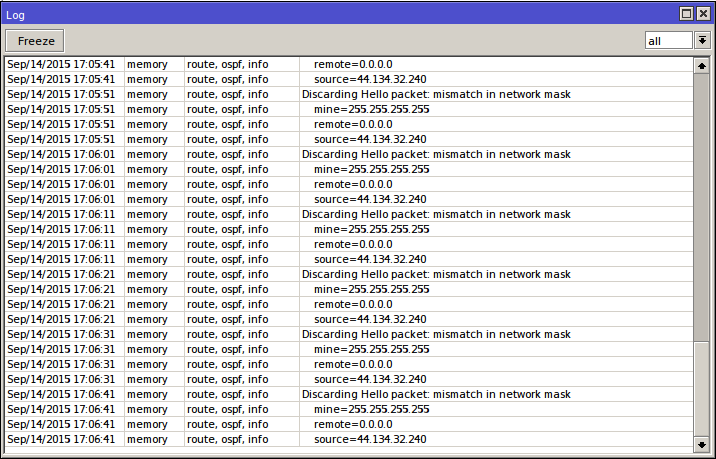
On Mon, Sep 14, 2015 at 06:05:31PM +0200, Gustavo Ponza wrote:
Hi Ondrej and all,
after a long time I need to setup a ppp tunnel between linux machine and a MikroTik router and the linux ppp0 interface ... Hello packets due to mismatch in network mask (see the following tcpdump on linux machine and Mikrotik log picture). There is a continue Hello packets as below with no apparent OSPF routing exchange. I'm using the latest BIRD git version... Something wrong on my side?
Hi Isn't this the same issue as this one: http://permalink.gmane.org/gmane.network.bird.user/3767 -- Elen sila lumenn' omentielvo Ondrej 'Santiago' Zajicek (email: santiago@crfreenet.org) OpenPGP encrypted e-mails preferred (KeyID 0x11DEADC3, wwwkeys.pgp.net) "To err is human -- to blame it on a computer is even more so."

Hi, On Mon, Sep 07, 2015 at 08:33:15PM +0530, Ajay Raut ( Tech Ops ) wrote:
I m trying to run BGP through the GRE tunnel, Tunnel is working fine.
auto gre-vpn iface gre-vpn inet tunnel address 10.200.206.249 mode gre endpoint 10.200.206.6 dstaddr 10.200.206.250 local 10.200.206.4 ttl 255 netmask 255.255.255.252
You have redundant information here: "dstaddr 10.200.206.250" will insert a /32 route towards 10.200.206.250. But since you configured 10.200.206.249/30 on the interface, you should already be able to reach 10.200.206.250, since the kernel will create the route 10.200.206.248/30 through the tunnel. This could be the source of your issue, since (IIRC) Bird sometimes has trouble with peers that are reachable with a /32 route. If removing the /32 route doesn't work, maybe adding a "protocol device" and "protocol direct" would solve the issue. Baptiste
Hi Baptiste, Thanks for the Response, Done the changes as you specified on gre-vpn interface configuration. auto gre-vpn iface gre-vpn inet tunnel mode gre address 10.200.206.249 endpoint 10.200.206.4 local 10.200.206.5 ttl 255 netmask 255.255.255.254 *Birdc status* BIRD 1.4.5 ready. bird> show protocols all v1 name proto table state since info v1 BGP master start 21:28:24 Active Socket: No route to host Preference: 100 Input filter: ACCEPT Output filter: ACCEPT Routes: 0 imported, 0 exported, 0 preferred Route change stats: received rejected filtered ignored accepted Import updates: 0 0 0 0 0 Import withdraws: 0 0 --- 0 0 Export updates: 0 0 0 --- 0 Export withdraws: 0 --- --- --- 0 BGP state: Active Neighbor address: 10.200.206.250 Neighbor AS: 65531 Start delay: 5/5 Last error: Socket: No route to host *Bird Configuration* protocol kernel { persist; # Don't remove routes on bird shutdown scan time 20; # Scan kernel routing table every 20 seconds export all; # Default is export none } protocol direct direct1 { export all; } protocol device { scan time 10; # Scan interfaces every 10 seconds export all; } protocol bgp v1 { #table clos; local as 65530; source address 10.200.206.249; neighbor 10.200.206.250 as 65531; multihop 10; import all; export all; } *Logs:*15-09-09 21:31:50 <TRACE> v1: Initializing 2015-09-09 21:31:50 <TRACE> v1: Starting 2015-09-09 21:31:50 <TRACE> v1: State changed to start 2015-09-09 21:31:50 <TRACE> v1: Started 2015-09-09 21:31:50 <TRACE> v1: Connect delayed by 5 seconds 2015-09-09 21:31:55 <TRACE> v1: Connecting to 10.200.206.250 from local address 10.200.206.249 2015-09-09 21:31:55 <TRACE> v1: Connection lost (No route to host) 2015-09-09 21:31:55 <TRACE> v1: Connect delayed by 5 seconds 2015-09-09 21:31:59 <TRACE> v1: Connecting to 10.200.206.250 from local address 10.200.206.249 2015-09-09 21:31:59 <TRACE> v1: Connection lost (No route to host) 2015-09-09 21:31:59 <TRACE> v1: Connect delayed by 5 seconds 2015-09-09 21:32:05 <TRACE> v1: Connecting to 10.200.206.250 from local address 10.200.206.249 2015-09-09 21:32:05 <TRACE> v1: Connection lost (No route to host) 2015-09-09 21:32:05 <TRACE> v1: Connect delayed by 5 seconds Though i see the same issue of No Route to host, Please let me know which part i have missed here. Thanks, Ajay On Tue, Sep 8, 2015 at 1:06 AM, Baptiste Jonglez < baptiste@bitsofnetworks.org> wrote:
Hi,
On Mon, Sep 07, 2015 at 08:33:15PM +0530, Ajay Raut ( Tech Ops ) wrote:
I m trying to run BGP through the GRE tunnel, Tunnel is working fine.
auto gre-vpn iface gre-vpn inet tunnel address 10.200.206.249 mode gre endpoint 10.200.206.6 dstaddr 10.200.206.250 local 10.200.206.4 ttl 255 netmask 255.255.255.252
You have redundant information here: "dstaddr 10.200.206.250" will insert a /32 route towards 10.200.206.250. But since you configured 10.200.206.249/30 on the interface, you should already be able to reach 10.200.206.250, since the kernel will create the route 10.200.206.248/30 through the tunnel.
This could be the source of your issue, since (IIRC) Bird sometimes has trouble with peers that are reachable with a /32 route.
If removing the /32 route doesn't work, maybe adding a "protocol device" and "protocol direct" would solve the issue.
Baptiste
-- ------------------------------------------------------------------------------------------------------------------------------------------ This email and any files transmitted with it are confidential and intended solely for the use of the individual or entity to whom they are addressed. If you have received this email in error please notify the system manager. This message contains confidential information and is intended only for the individual named. If you are not the named addressee you should not disseminate, distribute or copy this e-mail. Please notify the sender immediately by e-mail if you have received this e-mail by mistake and delete this e-mail from your system. If you are not the intended recipient you are notified that disclosing, copying, distributing or taking any action in reliance on the contents of this information is strictly prohibited. Although Flipkart has taken reasonable precautions to ensure no viruses are present in this email, the company cannot accept responsibility for any loss or damage arising from the use of this email or attachments
On Wed, Sep 09, 2015 at 09:34:20PM +0530, Ajay Raut ( Tech Ops ) wrote:
Hi Baptiste,
Thanks for the Response,
Done the changes as you specified on gre-vpn interface configuration.
...
Though i see the same issue of No Route to host, Please let me know which part i have missed here.
Hi To find the problem, it would be useful to know outputs of these commands: ip addr list ip route list birdc show interfaces -- Elen sila lumenn' omentielvo Ondrej 'Santiago' Zajicek (email: santiago@crfreenet.org) OpenPGP encrypted e-mails preferred (KeyID 0x11DEADC3, wwwkeys.pgp.net) "To err is human -- to blame it on a computer is even more so."
participants (4)
-
 Ajay Raut ( Tech Ops )
 -
 Baptiste Jonglez
 -
 Gustavo Ponza
 -
 Ondrej Zajicek