
Ahoy all, I'm struggling a little to set wireguard as a fallback link in conjunction with two MPLS links. In my tests BIRD would not route traffic through wg0 when I took the other two interfaces down. The setup is rather simple, two DCs, each side has a gw running BIRD. ---- Config DC1 ---- router id 192.168.184.1; ### Kernel ##################################################################### protocol kernel { scan time 15; # Scan kernel routing table every 15 seconds export all; # Default is export none } ### Device Monitor ############################################################# protocol device { scan time 10; # Scan interfaces every 10 seconds } ### OSPF ####################################################################### protocol ospf MyOSPF { tick 2; ecmp yes; rfc1583compat yes; area 0.0.0.0 { # Advertise DC1 prod net stubnet 192.168.184.0/24; # MPLS1 interface interface "macsec.2335" { cost 5; ecmp weight 1; bfd yes; authentication cryptographic; password "testtesttest" { id 1; algorithm hmac sha256; }; }; # MPLS2 interface interface "macsec.2334" { cost 5; ecmp weight 1; bfd yes; authentication cryptographic; password "testtesttest" { id 2; algorithm hmac sha256; }; }; # WireGuard Fallback interface "wg0" { cost 10; bfd yes; type pointopoint; authentication cryptographic; password "testtesttest" { id 3; algorithm hmac sha256; }; }; }; }; ### BFD ######################################################################## protocol bfd PCrewBFD { # BFD on DTAG interface interface "macsec.2335" { min rx interval 20 ms; min tx interval 50 ms; idle tx interval 300 ms; }; # BFD on Console-Networks interface interface "macsec.2334" { min rx interval 20 ms; min tx interval 50 ms; idle tx interval 300 ms; }; # BFD on WireGuard interface interface "wg0" { min rx interval 200 ms; min tx interval 500 ms; idle tx interval 3000 ms; }; # WTF is multihop?? multihop { interval 200 ms; multiplier 10; }; }; ---- Config DC2 ---- router id 192.168.148.1; ### Kernel ##################################################################### protocol kernel { scan time 15; # Scan kernel routing table every 20 seconds export all; # Default is export none } ### Device Monitor ############################################################# protocol device { scan time 10; # Scan interfaces every 10 seconds } ### OSPF ####################################################################### protocol ospf MyOSPF { tick 2; ecmp yes; rfc1583compat yes; area 0.0.0.0 { # Advertise MUC prod net stubnet 192.168.148.0/24; # MPLS1 interface interface "macsec.2335" { cost 5; ecmp weight 1; bfd yes; authentication cryptographic; password "testtesttest" { id 1; algorithm hmac sha256; }; }; # MPLS2 interface interface "macsec.2334" { cost 5; ecmp weight 1; bfd yes; authentication cryptographic; password "testtesttest" { id 2; algorithm hmac sha256; }; }; # WireGuard Fallback interface "wg0" { cost 10; bfd yes; type pointopoint; authentication cryptographic; password "testtesttest" { id 3; algorithm hmac sha256; }; }; }; }; ---- BIRD states ---- bird> show route 172.23.1.0/29 dev macsec.2335 [MyOSPF 09:26:22] * I (150/5) [192.168.184.1] 172.23.2.0/29 dev macsec.2334 [MyOSPF 09:26:22] * I (150/5) [192.168.184.1] 192.168.148.0/24 multipath [MyOSPF 09:27:26] * I (150/15) [192.168.148.1] via 172.23.1.2 on macsec.2335 weight 1 via 172.23.2.2 on macsec.2334 weight 1 172.23.3.0/29 dev wg0 [MyOSPF 09:26:22] * I (150/10) [192.168.184.1] bird> show ospf state all area 0.0.0.0 router 192.168.148.1 distance 5 network 172.23.2.0/29 metric 5 network 172.23.1.0/29 metric 5 stubnet 172.23.3.0/29 metric 10 stubnet 192.168.148.0/24 metric 10 router 192.168.164.1 distance 0 network 172.23.2.0/29 metric 5 network 172.23.1.0/29 metric 5 stubnet 172.23.3.0/29 metric 10 stubnet 192.168.184.0/24 metric 10 network 172.23.1.0/29 dr 192.168.164.1 distance 5 router 192.168.184.1 router 192.168.148.1 network 172.23.2.0/29 dr 192.168.164.1 distance 5 router 192.168.184.1 router 192.168.148.1 What makes me wonder is why wg0 is coming up as stubnet here, while the MPLS links come up as network (stubnet 172.23.3.0/29 metric 10) and 172.23.3.0/29 (wg0 net) not being listed. Any hints or corrections of my config to get this to work with wireguard would be very much appreciated.

On Thu, May 03, 2018 at 08:47:31AM +0000, chrono wrote:
Ahoy all,
I'm struggling a little to set wireguard as a fallback link in conjunction with two MPLS links. In my tests BIRD would not route traffic through wg0 when I took the other two interfaces down. The setup is rather simple, two DCs, each side has a gw running BIRD.
What makes me wonder is why wg0 is coming up as stubnet here, while the MPLS links come up as network (stubnet 172.23.3.0/29 metric 10) and 172.23.3.0/29 (wg0 net) not being listed.
Hi You don't see 172.23.3.0/29 as network, because these ifaces are configured as PtP, but still there should be 'router' line in apropriate router block to indicate existing PtP link. So apparently there is no association. You should check by 'show ospf neighbors' and use tcpdump to verify if each neighbor hears the other one. -- Elen sila lumenn' omentielvo Ondrej 'Santiago' Zajicek (email: santiago@crfreenet.org) OpenPGP encrypted e-mails preferred (KeyID 0x11DEADC3, wwwkeys.pgp.net) "To err is human -- to blame it on a computer is even more so."
Hi Ondrej, thanks for the quick reply.
What makes me wonder is why wg0 is coming up as stubnet here, while the MPLS links come up as network (stubnet 172.23.3.0/29 metric 10) and 172.23.3.0/29 (wg0 net) not being listed.
You don't see 172.23.3.0/29 as network, because these ifaces are configured as PtP, but still there should be 'router' line in apropriate router block to indicate existing PtP link.
Yes, while trying to debug someone on #BIRD (freenode) suggested that it may not work due to wg0 not being a broadcast interface: wg0 Link encap:UNSPEC HWaddr 00-00-00-00-00-00-00-00-00-00-00-00-00-00-00-00 inet addr:172.23.3.1 P-t-P:172.23.3.1 Mask:255.255.255.248 UP POINTOPOINT RUNNING NOARP MTU:1420 Metric:1 RX packets:102368 errors:0 dropped:0 overruns:0 frame:0 TX packets:103213 errors:10189 dropped:0 overruns:0 carrier:0 collisions:0 txqueuelen:1000 RX bytes:14697260 (14.6 MB) TX bytes:14771860 (14.7 MB) I checked bird docs and found the interface configuration option type and tried to set it to pointtopoint but with no success so far. Which would be the correct setting for a wireguard interface?
So apparently there is no association. You should check by 'show ospf neighbors' and use tcpdump to verify if each neighbor hears the other one.
Correct: bird> show ospf neighbors MyOSPF: Router ID Pri State DTime Interface Router IP 192.168.148.1 1 Full/BDR 00:34 macsec.2334 172.23.2.2 192.168.148.1 1 Full/BDR 00:34 macsec.2335 172.23.1.2 On both sides I only see the periodic: 14:41:00.172942 IP (tos 0xc0, ttl 1, id 13458, offset 0, flags [none], proto OSPF (89), length 96) 172.23.3.2 > 224.0.0.5: OSPFv2, Hello, length 60 [len 44] Router-ID 192.168.148.1, Backbone Area, Authentication Type: MD5 (2) Key-ID: 3, Auth-Length: 32, Crypto Sequence Number: 0x000852b4 Options [External] Hello Timer 10s, Dead Timer 40s, Mask 255.255.255.248, Priority 1 05:37:43.772608 IP (tos 0xc0, ttl 1, id 12083, offset 0, flags [none], proto OSPF (89), length 96) 172.23.3.1 > 224.0.0.5: OSPFv2, Hello, length 60 [len 44] Router-ID 192.168.184.1, Backbone Area, Authentication Type: MD5 (2) Key-ID: 3, Auth-Length: 32, Crypto Sequence Number: 0x000c1abe Options [External] Hello Timer 10s, Dead Timer 40s, Mask 255.255.255.248, Priority 1

chrono <chrono@open-resource.org> writes:
Hi Ondrej,
thanks for the quick reply.
What makes me wonder is why wg0 is coming up as stubnet here, while the MPLS links come up as network (stubnet 172.23.3.0/29 metric 10) and 172.23.3.0/29 (wg0 net) not being listed.
You don't see 172.23.3.0/29 as network, because these ifaces are configured as PtP, but still there should be 'router' line in apropriate router block to indicate existing PtP link.
Yes, while trying to debug someone on #BIRD (freenode) suggested that it may not work due to wg0 not being a broadcast interface:
How did you configure AllowedIPs on the wireguard interface? -Toke
On Thu, May 03, 2018 at 12:43:23PM +0000, chrono wrote:
Hi Ondrej,
thanks for the quick reply.
What makes me wonder is why wg0 is coming up as stubnet here, while the MPLS links come up as network (stubnet 172.23.3.0/29 metric 10) and 172.23.3.0/29 (wg0 net) not being listed.
You don't see 172.23.3.0/29 as network, because these ifaces are configured as PtP, but still there should be 'router' line in apropriate router block to indicate existing PtP link.
Yes, while trying to debug someone on #BIRD (freenode) suggested that it may not work due to wg0 not being a broadcast interface:
wg0 Link encap:UNSPEC HWaddr 00-00-00-00-00-00-00-00-00-00-00-00-00-00-00-00 inet addr:172.23.3.1 P-t-P:172.23.3.1 Mask:255.255.255.248 UP POINTOPOINT RUNNING NOARP MTU:1420 Metric:1 RX packets:102368 errors:0 dropped:0 overruns:0 frame:0 TX packets:103213 errors:10189 dropped:0 overruns:0 carrier:0 collisions:0 txqueuelen:1000 RX bytes:14697260 (14.6 MB) TX bytes:14771860 (14.7 MB)
I checked bird docs and found the interface configuration option type and tried to set it to pointtopoint but with no success so far. Which would be the correct setting for a wireguard interface?
PtP should be correct, but it is possible that as wireguard is a new thing, it has broken multicast handling. Generally, PtP tunnels should have no problems to use multicast - just send everything to the other side. But as the tcpdump on one side shows periodic hellos from both sides, then it is unlikely to be an issue. Also i saw that your config files do not have 'log' option, so you have no logging. You should enable logging and see if there are no error messages. Although unrelated, i would suggest to remove these OSPF options; tick 2; rfc1583compat yes; -- Elen sila lumenn' omentielvo Ondrej 'Santiago' Zajicek (email: santiago@crfreenet.org) OpenPGP encrypted e-mails preferred (KeyID 0x11DEADC3, wwwkeys.pgp.net) "To err is human -- to blame it on a computer is even more so."
PtP should be correct, but it is possible that as wireguard is a new thing, it has broken multicast handling. Generally, PtP tunnels should have no problems to use multicast - just send everything to the other side. But as the tcpdump on one side shows periodic hellos from both sides, then it is unlikely to be an issue.
The dumps I've pasted were on both gws and I don't really see it going through, I only saw the broadcast but never any kind of answer to it or coming out on the other side, so there still might be an issue.
Also i saw that your config files do not have 'log' option, so you have no logging. You should enable logging and see if there are no error messages.
I didn't paste the log options from the conf, they're at the top, but you're right, I should have enabled debugging as well to get a better view.
Although unrelated, i would suggest to remove these OSPF options;
tick 2; rfc1583compat yes;
Care to elaborate why? I do trust that you will know better.
Also i saw that your config files do not have 'log' option, so you have no logging. You should enable logging and see if there are no error messages.
Ah, interesting: 2018-05-03 15:37:32 <TRACE> MyOSPF: HELLO packet sent via wg0 2018-05-03 15:37:32 <ERR> MyOSPF: Socket error on wg0: Required key not available That may also indicate AllowedIP issue, if I'm not mistaken?
On Thu, May 03, 2018 at 01:39:31PM +0000, chrono wrote:
Also i saw that your config files do not have 'log' option, so you have no logging. You should enable logging and see if there are no error messages.
Ah, interesting:
2018-05-03 15:37:32 <TRACE> MyOSPF: HELLO packet sent via wg0 2018-05-03 15:37:32 <ERR> MyOSPF: Socket error on wg0: Required key not available
That may also indicate AllowedIP issue, if I'm not mistaken?
Yes, that seems like a wireguard issue. Perhaps wireguard has problems with multicast dst because it does not know which key to use? Just guessing, i do not know wireguard. Possible workaround would be to configure OSPF on that iface as ptmp and specify neighbor address using 'neighbors' option. In such setting only unicast is used.
Although unrelated, i would suggest to remove these OSPF options;
tick 2; rfc1583compat yes;
Care to elaborate why? I do trust that you will know better. 'tick 2' will increase convergence time form ~1 sec to ~2 sec. 'rfc1583compat' is an obscure OSPF option for compatibility with ancient RFC 1583 in some multi-area setups for the price of persistent routing loops in some other multi-area setups. Completely irrelevant for single-area setups. -- Elen sila lumenn' omentielvo Ondrej 'Santiago' Zajicek (email: santiago@crfreenet.org) OpenPGP encrypted e-mails preferred (KeyID 0x11DEADC3, wwwkeys.pgp.net) "To err is human -- to blame it on a computer is even more so."
That may also indicate AllowedIP issue, if I'm not mistaken?
Yes, that seems like a wireguard issue. Perhaps wireguard has problems with multicast dst because it does not know which key to use? Just guessing, i do not know wireguard.
Possible workaround would be to configure OSPF on that iface as ptmp and specify neighbor address using 'neighbors' option. In such setting only unicast is used.
Since the 0.0.0.0/0 approach didn't work, I'll try this next and see what happens. Thanks for suggesting alternatives.
Although unrelated, i would suggest to remove these OSPF options;
tick 2; rfc1583compat yes;
Care to elaborate why? I do trust that you will know better.
'tick 2' will increase convergence time form ~1 sec to ~2 sec.
'rfc1583compat' is an obscure OSPF option for compatibility with ancient RFC 1583 in some multi-area setups for the price of persistent routing loops in some other multi-area setups. Completely irrelevant for single-area setups.
check. thanks for clearing that up.

Hi, On Thu, May 03, 2018 at 08:47:31AM +0000, chrono wrote:
Ahoy all,
I'm struggling a little to set wireguard as a fallback link in conjunction with two MPLS links. In my tests BIRD would not route traffic through wg0 when I took the other two interfaces down. The setup is rather simple, two DCs, each side has a gw running BIRD.
[ ... ] just to be sure that not wireguard is the problem here, how looks your AllowedIPs within the wireguard config? Maybe it does not allow traffic of the routers? regards, tim -- Tim Weippert http://weiti.org - weiti@weiti.org GPG Fingerprint - E704 7303 6FF0 8393 ADB1 398E 67F2 94AE 5995 7DD8
[ ... ]
just to be sure that not wireguard is the problem here, how looks your AllowedIPs within the wireguard config?
Maybe it does not allow traffic of the routers?
That may be so, currently I only have each opposite site in there AllowedIPs = 172.23.3.1/32 (on 172.23.3.2) AllowedIPs = 172.23.3.2/32 (on 172.23.3.1) During my prior tests it started to try to route everything down via wg0 when I tried to add 192.168.148.0/24 or 192.168.184.0/24 as soon as the tunnel got up. How should wg config be set up for this, so that it doesn't interfere with BIRD routing? I've tried to find any working example with BIRD and WG on the net but there was nothing really :/
chrono <chrono@open-resource.org> writes:
[ ... ]
just to be sure that not wireguard is the problem here, how looks your AllowedIPs within the wireguard config?
Maybe it does not allow traffic of the routers?
That may be so, currently I only have each opposite site in there
AllowedIPs = 172.23.3.1/32 (on 172.23.3.2) AllowedIPs = 172.23.3.2/32 (on 172.23.3.1)
During my prior tests it started to try to route everything down via wg0 when I tried to add 192.168.148.0/24 or 192.168.184.0/24 as soon as the tunnel got up.
How should wg config be set up for this, so that it doesn't interfere with BIRD routing? I've tried to find any working example with BIRD and WG on the net but there was nothing really :/
You need to set AllowedIPs to 0.0.0.0/0 on both sides. That way wireguard will pass all traffic through (that only works for p2p links with only two peers, obviously). In your current setup, wireguard won't pass the OSPF multicast traffic, so you will see no neighbour associations. And even if you did, bird doesn't know how to amend AllowedIPs for wireguard, so it won't work. However, with the p2p config and 0.0.0.0/0 in AllowedIPs things should work. There is a Wireguard GSOC project to add AllowedIP awareness to Bird, BTW, so in the future things may be easier :) -Toke
You need to set AllowedIPs to 0.0.0.0/0 on both sides. That way wireguard will pass all traffic through (that only works for p2p links with only two peers, obviously). In your current setup, wireguard won't pass the OSPF multicast traffic, so you will see no neighbour associations. And even if you did, bird doesn't know how to amend AllowedIPs for wireguard, so it won't work.
However, with the p2p config and 0.0.0.0/0 in AllowedIPs things should work.
Toke, thanks for the details, weird things are happening with 0.0.0.0/0 DC1 (CentOS Linux release 7.4.1708 (Core)) $ wg-quick up wg0 [#] ip link add wg0 type wireguard [#] wg setconf wg0 /dev/fd/63 [#] ip address add 172.23.3.2/29 dev wg0 [#] ip link set mtu 1420 dev wg0 [#] ip link set wg0 up [#] wg set wg0 fwmark 51820 [#] ip -4 route add 0.0.0.0/0 dev wg0 table 51820 [#] ip -4 rule add not fwmark 51820 table 51820 [#] ip -4 rule add table main suppress_prefixlength 0 Error: argument "suppress_prefixlength" is wrong: Failed to parse rule type [#] ip -4 rule delete table 51820 [#] ip link delete dev wg0 wg0 simply not coming up DC2 (Ubuntu 16.04.4 LTS) $ wg-quick up wg0 [#] ip link add wg0 type wireguard [#] wg setconf wg0 /dev/fd/63 [#] ip address add 172.23.3.1/29 dev wg0 [#] ip link set mtu 1420 dev wg0 [#] ip link set wg0 up [#] wg set wg0 fwmark 51820 [#] ip -4 route add 0.0.0.0/0 dev wg0 table 51820 [#] ip -4 rule add not fwmark 51820 table 51820 [#] ip -4 rule add table main suppress_prefixlength 0 [#] iptables -A FORWARD -i wg0 -j ACCEPT; but afterwards no more traffic is going through the default gw and all boxes behind the gw are offline.
There is a Wireguard GSOC project to add AllowedIP awareness to Bird, BTW, so in the future things may be easier :)
Sweet, looking forward to that.
chrono <chrono@open-resource.org> writes:
You need to set AllowedIPs to 0.0.0.0/0 on both sides. That way wireguard will pass all traffic through (that only works for p2p links with only two peers, obviously). In your current setup, wireguard won't pass the OSPF multicast traffic, so you will see no neighbour associations. And even if you did, bird doesn't know how to amend AllowedIPs for wireguard, so it won't work.
However, with the p2p config and 0.0.0.0/0 in AllowedIPs things should work.
Toke, thanks for the details, weird things are happening with 0.0.0.0/0
DC1 (CentOS Linux release 7.4.1708 (Core))
$ wg-quick up wg0 [#] ip link add wg0 type wireguard [#] wg setconf wg0 /dev/fd/63 [#] ip address add 172.23.3.2/29 dev wg0 [#] ip link set mtu 1420 dev wg0 [#] ip link set wg0 up [#] wg set wg0 fwmark 51820 [#] ip -4 route add 0.0.0.0/0 dev wg0 table 51820 [#] ip -4 rule add not fwmark 51820 table 51820 [#] ip -4 rule add table main suppress_prefixlength 0 Error: argument "suppress_prefixlength" is wrong: Failed to parse rule type [#] ip -4 rule delete table 51820 [#] ip link delete dev wg0
wg0 simply not coming up
Ah, this is because wg-quick tries to also set a kernel route for 0.0.0.0/0 over the interface. That is not what you want here. I think you may have to stop using wg-quick for this setup, and set up the wireguard interface in a different way... You can remove the options that the normal wg binary doesn't understand from the config file (DNS and IP address configuration, mainly), and set it up with that, then configure the IP addresses manually (or with a script). Alternatively, you can use systemd to setup the whole thing... -Toke
$ wg-quick up wg0 [#] ip link add wg0 type wireguard [#] wg setconf wg0 /dev/fd/63 [#] ip address add 172.23.3.2/29 dev wg0 [#] ip link set mtu 1420 dev wg0 [#] ip link set wg0 up [#] wg set wg0 fwmark 51820 [#] ip -4 route add 0.0.0.0/0 dev wg0 table 51820 [#] ip -4 rule add not fwmark 51820 table 51820 [#] ip -4 rule add table main suppress_prefixlength 0 Error: argument "suppress_prefixlength" is wrong: Failed to parse rule type [#] ip -4 rule delete table 51820 [#] ip link delete dev wg0
wg0 simply not coming up
Ah, this is because wg-quick tries to also set a kernel route for 0.0.0.0/0 over the interface. That is not what you want here. I think you may have to stop using wg-quick for this setup, and set up the wireguard interface in a different way... You can remove the options that the normal wg binary doesn't understand from the config file (DNS and IP address configuration, mainly), and set it up with that, then configure the IP addresses manually (or with a script). Alternatively, you can use systemd to setup the whole thing...
Yeah, that was my presumption as well, that wireguard would mess with my routes when AllowedIPs is anything else than 172.23.3.x, that's why I had it restricted to it as a "fix". I didn't realize it wasn't wg as such, but a consequence of wg-quick usage. I'll do my homework how to manually setup the interfaces and test again to see if that does the trick. Thanks guys, for all your help and inputs! <3
On 2018-05-03 15:37, chrono wrote:
$ wg-quick up wg0 [#] ip link add wg0 type wireguard [#] wg setconf wg0 /dev/fd/63 [#] ip address add 172.23.3.2/29 dev wg0 [#] ip link set mtu 1420 dev wg0 [#] ip link set wg0 up [#] wg set wg0 fwmark 51820 [#] ip -4 route add 0.0.0.0/0 dev wg0 table 51820 [#] ip -4 rule add not fwmark 51820 table 51820 [#] ip -4 rule add table main suppress_prefixlength 0 Error: argument "suppress_prefixlength" is wrong: Failed to parse rule type [#] ip -4 rule delete table 51820 [#] ip link delete dev wg0
wg0 simply not coming up
Ah, this is because wg-quick tries to also set a kernel route for 0.0.0.0/0 over the interface. That is not what you want here. I think you may have to stop using wg-quick for this setup, and set up the wireguard interface in a different way... You can remove the options that the normal wg binary doesn't understand from the config file (DNS and IP address configuration, mainly), and set it up with that, then configure the IP addresses manually (or with a script). Alternatively, you can use systemd to setup the whole thing...
Yeah, that was my presumption as well, that wireguard would mess with my routes when AllowedIPs is anything else than 172.23.3.x, that's why I had it restricted to it as a "fix". I didn't realize it wasn't wg as such, but a consequence of wg-quick usage. I'll do my homework how to manually setup the interfaces and test again to see if that does the trick. Thanks guys, for all your help and inputs! <3
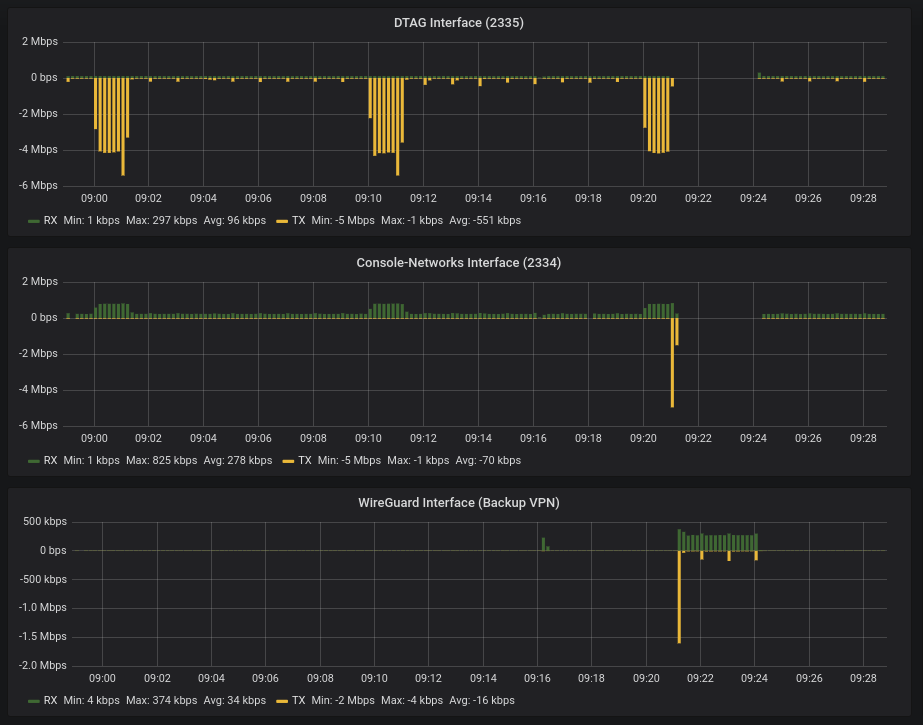
Thanks to all who helped. After dropping wg-quick and setting up wg by hand the wg interface still comes up as stubnet in BIRD. network 172.23.1.0/29 metric 5 network 172.23.2.0/29 metric 5 stubnet 172.23.3.0/29 metric 10 However, routing works and BIRD reliably routes traffic through wg0 when the MPLS multipath links are both down. It seems of no consequence whether the wg interface is configured in BIRD as pointtopoint or broadcast. See screenshot. 13:49:36.641952 IP 172.23.3.2 > 224.0.0.5: OSPFv2, Hello, length 64 13:49:41.758654 IP 172.23.3.1 > 224.0.0.5: OSPFv2, Hello, length 64 13:49:46.772493 IP 172.23.3.2 > 224.0.0.5: OSPFv2, Hello, length 64 13:49:50.887503 IP 172.23.3.1 > 224.0.0.5: OSPFv2, Hello, length 64
On Thu, May 03, 2018 at 08:47:31AM +0000, chrono wrote:
Ahoy all,
I'm struggling a little to set wireguard as a fallback link in conjunction with two MPLS links. In my tests BIRD would not route traffic through wg0 when I took the other two interfaces down. The setup is rather simple, two DCs, each side has a gw running BIRD.
---- Config DC1 ----
router id 192.168.184.1;
---- Config DC2 ----
router id 192.168.148.1;
It seems that both routers have the same Router ID, that is broken setup and may be the issue. -- Elen sila lumenn' omentielvo Ondrej 'Santiago' Zajicek (email: santiago@crfreenet.org) OpenPGP encrypted e-mails preferred (KeyID 0x11DEADC3, wwwkeys.pgp.net) "To err is human -- to blame it on a computer is even more so."
On Thu, May 03, 2018 at 02:54:41PM +0200, Ondrej Zajicek wrote:
On Thu, May 03, 2018 at 08:47:31AM +0000, chrono wrote:
Ahoy all,
I'm struggling a little to set wireguard as a fallback link in conjunction with two MPLS links. In my tests BIRD would not route traffic through wg0 when I took the other two interfaces down. The setup is rather simple, two DCs, each side has a gw running BIRD.
---- Config DC1 ----
router id 192.168.184.1;
---- Config DC2 ----
router id 192.168.148.1;
It seems that both routers have the same Router ID, that is broken setup and may be the issue.
Oh, i missed the 184 / 148 distinction. -- Elen sila lumenn' omentielvo Ondrej 'Santiago' Zajicek (email: santiago@crfreenet.org) OpenPGP encrypted e-mails preferred (KeyID 0x11DEADC3, wwwkeys.pgp.net) "To err is human -- to blame it on a computer is even more so."
participants (4)
-
 chrono
 -
 Ondrej Zajicek
 -
 Tim Weippert
 -
 Toke Høiland-Jørgensen