BIRD unknown character using text editor

I am using a text editor on Windows to edit the bird.conf. When I get my bird.conf in my linux machine and I try bird -p I get this error at the end of the line: Unknown character But everything is right. How can I solve? Thanks, Fabiano

Ensure your text editor is saving the file in UTF-8 (which is not the default on Windows). The default encoding on Windows is UTF-16 which is not compatible with most UNIX software. In Win10 Notepad, the File->Save As dialog has an Encoding drop-down where you can change it. -Adam On Jun. 2, 2020 06:56, Fabiano D'Agostino <fabiano.dagostino96@gmail.com> wrote: I am using a text editor on Windows to edit the bird.conf. When I get my bird.conf in my linux machine and I try bird -p I get this error at the end of the line: Unknown character But everything is right. How can I solve? Thanks, Fabiano
Hey Adam, thank you, I was able to solve using dos2unix command. Fabiano Il giorno mar 2 giu 2020 alle ore 14:03 Adam Thompson < athompson@merlin.mb.ca> ha scritto:
Ensure your text editor is saving the file in UTF-8 (which is not the default on Windows). The default encoding on Windows is UTF-16 which is not compatible with most UNIX software. In Win10 Notepad, the File->Save As dialog has an Encoding drop-down where you can change it. -Adam
On Jun. 2, 2020 06:56, Fabiano D'Agostino <fabiano.dagostino96@gmail.com> wrote: I am using a text editor on Windows to edit the bird.conf. When I get my bird.conf in my linux machine and I try bird -p I get this error at the end of the line: Unknown character
But everything is right.
How can I solve?
Thanks,
Fabiano

Hello!
Ensure your text editor is saving the file in UTF-8 (which is not the default on Windows). The default encoding on Windows is UTF-16 which is not compatible with most UNIX software. In Win10 Notepad, the File->Save As dialog has an Encoding drop-down where you can change it.
I guess it might have been the UTF-8 Byte Order Mark, which is a common bad habit of Windows text editors. Have a nice fortnight -- Martin `MJ' Mareš <mj@ucw.cz> http://mj.ucw.cz/ United Computer Wizards, Prague, Czech Republic, Europe, Earth, Universe For every complex problem, there's a solution that is simple, neat and wrong.

have you tried running the file through the 'dos2unix' utility to remove Windows specific quirks from the file? Kind regards, Job On Tue, Jun 2, 2020, at 11:55, Fabiano D'Agostino wrote:
I am using a text editor on Windows to edit the bird.conf. When I get my bird.conf in my linux machine and I try bird -p I get this error at the end of the line: Unknown character
But everything is right.
How can I solve?
Thanks,
Fabiano
Hey Job, yes I solved using dos2unix. Fabiano Il giorno mar 2 giu 2020 alle ore 14:42 Job Snijders <job@ntt.net> ha scritto:
have you tried running the file through the 'dos2unix' utility to remove Windows specific quirks from the file?
Kind regards,
Job
On Tue, Jun 2, 2020, at 11:55, Fabiano D'Agostino wrote:
I am using a text editor on Windows to edit the bird.conf. When I get my bird.conf in my linux machine and I try bird -p I get this error at the end of the line: Unknown character
But everything is right.
How can I solve?
Thanks,
Fabiano

On Tue, 2 Jun 2020 at 15:51, Fabiano D'Agostino wrote:
solved using dos2unix
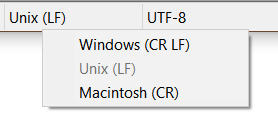
[image: image.png] "Notepad++ <https://notepad-plus-plus.org/> is a good friend" when running Win and editing *nix files
participants (5)
-
 Adam Thompson
 -
 Chriztoffer Hansen
 -
 Fabiano D'Agostino
 -
 Job Snijders
 -
 Martin Mareš